Kafka and Zookeeper
Preferring local clusters in Frontend and Consumers
To ensure the lowest possible response times, it is recommended to connect to local zookeeper and kafka clusters. In the configuration, you can specify the properties of multiple clusters. For example:
consumer:
  datacenter:
    name:
      source: "ENV"
      env: "DC"
  zookeeper:
    clusters:
      - datacenter: "dc-1"
        connectionString: "zk-1:2181"
      - datacenter: "dc-2"
        connectionString: "zk-2:2181"
  kafka:
    clusters:
      - datacenter: "dc-1"
        brokerList: "kafka-1:9092"
      - datacenter: "dc-2"
        brokerList: "kafka-2:9092"
If you don't specify the {modulePrefix}.datacenter.name.source property hermes will look for a cluster in properties with the datacenter: "dc" property.
Hermes also supports retrieving information about the name of the datacenter based on an environment variable. All you have to do is specify
{modulePrefix}.datacenter.name.source to ENV just like above, and the name of variable {modulePrefix}.datacenter.name.env in which the datacenter name is stored.
Zookeeper
Hermes uses Zookeeper as metadata store. It does not have to be the same Zookeeper as the one used by Kafka.
| Option in Frontend/Consumers/Management | Description | Default value |
|---|---|---|
| {modulePrefix}.zookeeper.clusters.[n].connectionString | Zookeeper connection string | localhost:2181 |
| {modulePrefix}.zookeeper.clusters.[n].connectionTimeout | connection timeout in seconds | 10s |
| {modulePrefix}.zookeeper.clusters.[n].maxRetries | retry count when connection fails | 2 |
| {modulePrefix}.zookeeper.clusters.[n].baseSleepTime | time to wait between subsequent retries in seconds | 1s |
| {modulePrefix}.zookeeper.clusters.[n].root | prefix for Hermes data (if not specified in connection string) | /hermes |
| {modulePrefix}.zookeeper.clusters.[n].authentication.enabled | enable Zookeeper authentication | false |
| {modulePrefix}.zookeeper.clusters.[n].authentication.scheme | authentication scheme | digest |
| {modulePrefix}.zookeeper.clusters.[n].authentication.user | username | user |
| {modulePrefix}.zookeeper.clusters.[n].authentication.password | password | password |
Kafka
Single Kafka cluster
In simple case, Hermes is connected to just one Kafka cluster. Frontend and Consumers connect to Kafka to publish and pull messages. Management connects to Kafka to manage existing topics and initiate retransmissions.
Frontend, Consumers and Management options:
| Option | Description | Default value |
|---|---|---|
| {modulePrefix}.kafka.brokerList | list of all brokers in the cluster (or at least some contact points); separated with ',' | localhost:9092 |
| {modulePrefix}.kafka.clusterName | name of Kafka cluster (relevant only when connecting to multiple clusters) | primary-dc |
Management module can connect to multiple Kafka clusters at once (see section below), thus when specifying connection option is done per cluster. Simple configuration for single cluster looks following:
management:
  kafka:
    namespace: // namespace shared by all clusters, default: <empty>
    clusters:
      -
        clusterName: // name of cluster, can be any arbitrary string, default: primary-dc
        brokerList: // connection string to cluster, default: localhost:9092
Multiple Kafka and Zookeeper clusters
Hermes can be configured to publish and read messages to/from multiple Kafka clusters and to store metadata in multiple Zookeeper clusters. We use this feature on production environment where we have separated kafka clusters in different data centers. If Kafka in one DC fails, whole traffic can be routed to the second DC. This scenario assumes, that Kafka clusters hold different set of messages. There is no support for multiple clusters each holding the same copy of data.
This is the schematics of two data center architecture:
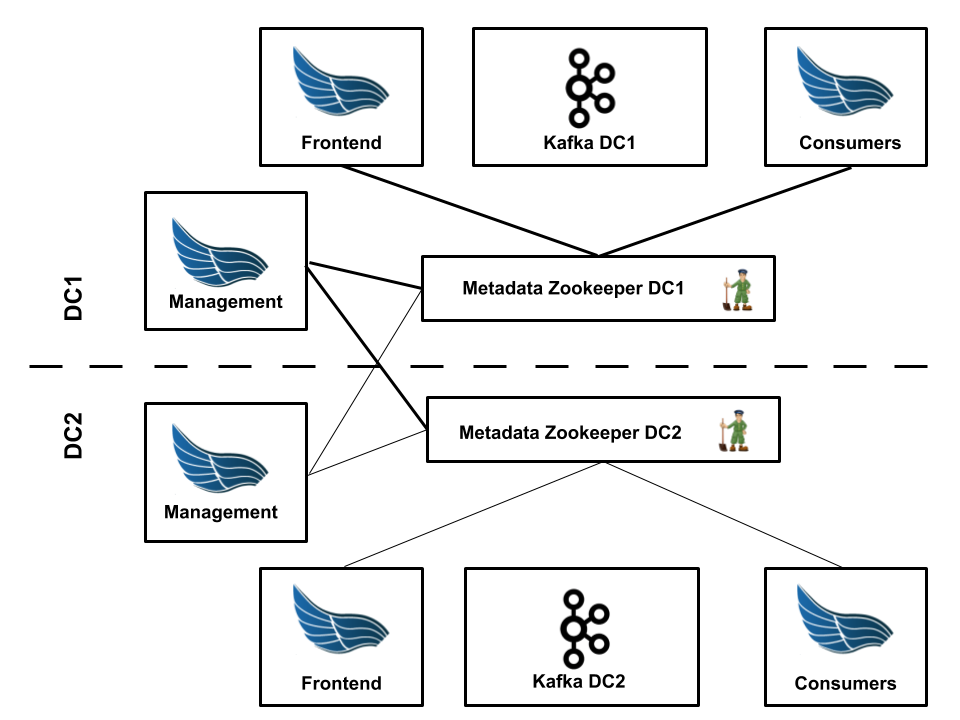
- there are specific Frontend and Consumers instances per cluster:
- each Frontend instance writes data to single cluster
- each Consumers instance reads data from single cluster
- each Management instance:
- connects to all Kafka clusters and keeps topics and subscriptions in-sync
- connects to all Zookeeper clusters and keeps metadata in-sync
Configuring Frontend and Consumers is easy: use configuration options from previous chapter to
connect to given clusters. Remember about specifying proper {modulePrefix}.kafka.clusterName.
Since Management instances need to know all clusters, their configuration is bit more complex. Example configuration for the schematics provided above:
management:
  kafka:
    clusters:
      -
        datacenter: dc1
        clusterName: kafka_primary
        brokerList: kafka-zookeeper-dc1:2181
      -
        datacenter: dc2
        clusterName: kafka_secondary
        brokerList: kafka-zookeeper-dc2:2181

  zookeeper:
    clusters:
      -
        root: /hermes
        datacenter: dc1
        connectionString: zookeeper-dc1:2181
      -
        root: /hermes
        datacenter: dc2
        connectionString: zookeeper-dc2:2181
Multiple Hermes on single Kafka cluster
It’s also possible to run multiple Hermes clusters on a single Kafka cluster, e.g. to separate different test environments.
To do this, on each Hermes cluster you have to provide different value for:
* {modulePrefix}.kafka.namespace property in Frontend, Consumers and Management.
* {modulePrefix}.zookeeper.root property in Frontend and Consumers and Management if you use the same Zookeeper cluster for all Hermes clusters.
{modulePrefix}.kafka.namespace property also can be used to distinguish Hermes-managed topics on multi-purpose Kafka cluster.